This guide covers the basics of modifying existing subscriptions to reflect the customer's changing needs. Ensure you've completed the Get started section to authenticate with Zuora. This tutorial is part of the Essential Skills Path.
Customers don't just sign up for new subscriptions, they add products to, remove products from, suspend, resume, renew, and cancel their subscriptions. This tutorial builds upon the examples in the previous Create subscriptions tutorial.
For this tutorial, we will build out this example subscription timeline starting Jan 1st, 2024 and ending March 21st, 2025:
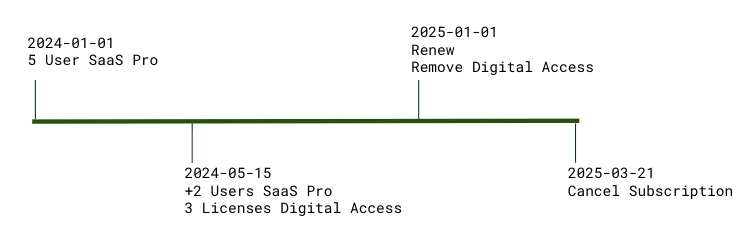
When created, the subscription had a 12 month initial term with the option to extend that for another 12 months. Initially the customer started with a 5 user license for CloudStream SaaS Pro, then added another two seats on May 15th, combining that order with the addition of 3 licenses of CloudStream Digital Access. Both rate plans are configured to bill monthly. Invoice activity was intentionally left out of the above timeline for simplicity.
The following screenshots are the Product Catalog UI for these two products. They include the object IDs we will need for the orders calls:
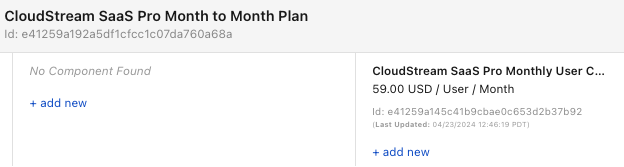
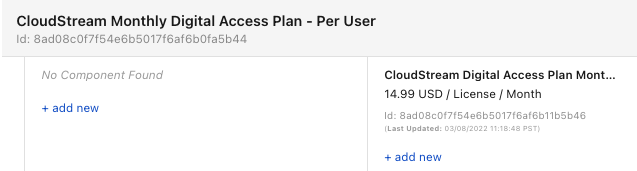
The following sample code shows you how to create this subscription with an order and start date of Jan 1st, 2024 for 5 users of "CloudStream SaaS Pro":
curl -i  -X POST https://rest.apisandbox.zuora.com/v1/orders \
 -H "Authorization: Bearer $ztoken" \
 -H "Content-Type: application/json" \
 -d '
   {
   "orderDate": "2024-01-01",
   "existingAccountNumber": "A00000001",
   "subscriptions": [
       {
       "orderActions": [
           {
           "type": "CreateSubscription",
           "createSubscription": {
               "terms": {
               "initialTerm": {
                   "period": 12,
                   "periodType": "Month",
                   "termType": "TERMED"
               },
               "renewalTerms": [
                   {
                   "period": 12,
                   "periodType": "Month"
                   }
               ],
               "renewalSetting": "RENEW_WITH_SPECIFIC_TERM",
               "autoRenew": true
               },
               "invoiceSeparately": true,
               "subscribeToRatePlans": [
               {
                   "productRatePlanId": "e41259a192a5df1cfcc1c07da760a68a",
                   "chargeOverrides": [
                   {
                       "productRatePlanChargeId": "e41259a145c41b9cbae0c653d2b37b92",
                       "pricing": {
                         "recurringPerUnit": {
                           "quantity" : 5
                         }
                       }
                   }
                   ]
               }
               ]
           },
           "triggerDates": [
               {
               "name": "ContractEffective",
               "triggerDate": "2024-01-01"
               }
           ]
           }
       ]
       }
       ],
       "processingOptions": {
           "runBilling": true
       }
   }'
You should expect to see a response payload similar to this:
{
  "success" : true,
  "orderNumber" : "O-00027967",
  "accountNumber" : "A00000001",
  "status" : "Completed",
  "subscriptionNumbers" : [ "A-S00000181" ],
  "invoiceNumbers" : [ "INV00029120" ]
}
If the returned status is Pending, you should specify the additional triggerDates your tenant is configured to require:
{"name": "ServiceActivation", "triggerDate": "2024-05-15"},
{"name": "CustomerAcceptance", "triggerDate": "2024-05-15"}
If you know this account has an active default payment method on file, you can also configure an immediate payment for the new invoice by modifying processingOptions:
"processingOptions": {
    "runBilling": true,
    "collectPayment": true
}
When you combine the runBilling and collectPayment options with an order, all these operations become atomic. They either all succeed or roll back. So if the payment fails for any reason, for example, the customer has maxed out their credit card, then the new subscription and invoice are also rolled back and undone.
On our subscription timeline, the next event occurs on May 15th, 2024 when the customer places an "add on" order for 2 extra users of "CloudStream SaaS Pro" and for 3 licenses of "CloudStream Digital Access". This will require an order with two order actions:
- An
UpdateProductorder action to change the product quantity for "CloudStream SaaS Pro" - An
AddProductorder action to add the 3 licenses for "CloudStream Digital Access"
Before we can update the existing product quantity on the subscription we need to know the rate plan ID, rate plan charge ID, and the current quantity of "CloudStream SaaS Pro" for this customer. So we first need to query this information using the synchronous Object Query endpoints for subscription:
curl --request GET \
--url 'https://rest.apisandbox.zuora.com/object-query/subscriptions/A-S00000181?subscription.fields[]=name,version&expand[]=rateplans&rateplans.fields[]=id,name&expand[]=rateplans.rateplancharges&rateplancharges.fields[]=id,chargenumber,name,quantity'\
  -H "Authorization: Bearer $ztoken" \
  -H "Content-Type: application/json"
This will return:
{
  "name": "A-S00000181",
  "version": 1,
  "ratePlans": [
    {
      "id": "f94fb5249a496ecf5dc6f2710b912d0d",
      "name": "CloudStream SaaS Pro Month to Month Plan",
      "ratePlanCharges": [
        {
          "id": "e51b5a88a0996d238ea6e9a227033d6a",
          "chargeNumber": "C-00000595",
          "name": "CloudStream SaaS Pro Monthly User Charge",
          "quantity": 5.0
        }
      ]
    }
  ]
}
The following sample code calls the Orders API using this information:
curl -i  -X POST https://rest.apisandbox.zuora.com/v1/orders \
-H "Authorization: Bearer $ztoken" \
-H "Content-Type: application/json" \
-d '
{
    "orderDate": "2024-05-15",
    "existingAccountNumber": "A00000001",
    "processingOptions":
        {
          "runBilling": true
        },
    "subscriptions": [
        {
            "subscriptionNumber": "A-S00000181",
            "orderActions": [
                {
                    "type": "AddProduct",
                    "triggerDates": [
                            {"name": "ContractEffective", "triggerDate": "2024-05-15"}
                        ],
                    "addProduct": {
                        "productRatePlanId": "8ad08c0f7f54e6b5017f6af6b0fa5b44",
                        "chargeOverrides": [
                            {
                                "productRatePlanChargeId": "8ad08c0f7f54e6b5017f6af6b11b5b46",
                                "pricing": {"recurringPerUnit": {"quantity": 3}}
                            }
                        ]
                    }
                },
                {
                    "type": "UpdateProduct",
                    "triggerDates": [
                          {"name": "ContractEffective", "triggerDate": "2024-05-15"}
                    ],
                    "updateProduct": {
                        "ratePlanId": "f94fb5249a496ecf5dc6f2710b912d0d",
                        "chargeUpdates": [
                            {
                                "chargeNumber": "C-00000595",
                                "pricing": {"recurringPerUnit": {"quantity": 7}}
                            }
                        ]
                    }
                }
            ]
        }
    ]
}'
This will return a response similar to the following example:
{
  "success" : true,
  "orderNumber" : "O-00000919",
  "accountNumber" : "A00000001",
  "status" : "Completed",
  "subscriptionNumber": ["A-S00000182"],
  "invoiceNumbers" : [ "INV00000284" ]
}Towards the end of the year, the customer agrees to renew but they also want to remove the CloudStream Digital plan from their subscription. Therefore, we need a second order with two order actions:
- An
RenewSubscriptionorder action for subscription renewal - An
RemoveProductorder action for removing the Digital Access rate plan.
Running an Object Query call on the subscription now returns:
{
  "name": "A00000001",
  "version": 2,
  "ratePlans": [
    {
      "id": "f94f5a88a8a96ecf5e06f6643b2b737f",
      "name": "CloudStream Monthly Digital Access Plan - Per User",
      "ratePlanCharges": [
        {
          "chargeNumber": "C-00026073",
          "effectiveEndDate": "2025-01-01",
          "effectiveStartDate": "2024-05-15",
          "id": "e51b9da0c8d96d24c9e6ea1bd1b3820d",
          "name": "CloudStream Digital Access Plan Monthly Flat Fee Charge",
          "quantity": 3.0,
          "segment": 1
        }
      ]
    },
    {
      "id": "f94fb5249a496ecf5dc6f2710b912d0d",
      "name": "CloudStream SaaS Pro Month to Month Plan",
      "ratePlanCharges": [
        {
          "chargeNumber": "C-00000595",
          "effectiveEndDate": "2025-01-01",
          "effectiveStartDate": "2024-05-15",
          "id": "e51b9da0c8d96d24c9e6ea1bd283821a",
          "name": "CloudStream SaaS Pro Monthly User Charge",
          "quantity": 7.0,
          "segment": 2
        },
        {
          "chargeNumber": "C-00000595",
          "effectiveEndDate": "2024-05-15",
          "effectiveStartDate": "2024-01-01",
          "id": "e51b5a88a0996d238ea6e9a227033d6a",
          "name": "CloudStream SaaS Pro Monthly User Charge",
          "quantity": 5.0,
          "segment": 1
        }
      ]
    }
  ]
}
We modified the subscription Object Query call to add some additional fields. Now we'll explain why there appear to be two rate plan charges for SaaS Pro.
There aren’t actually two charges. They share the same charge number, but the charge has two segments - one documenting the quantity prior to the update on May 15th and the other showing the changed quantity of 7 starting May 15th. These seamlessly contiguous segments document the charge quantity in effect on any date.
The second segment’s effective end date is January 1st, 2025. If no changes are made to this subscription, the subscription would end on January 1st, 2025, and billing would stop with their last invoice on December 1st, 2024. But we will make the following changes to this subscription:
- Renew the subscription for another 12 months. After the renewal, the second segment will have an end date of January 1st, 2026.
- Remove the "CloudStream Digital Access" plan.
The query results above provide us with the necessary IDs and numbers for the new order:
curl -i  -X POST https://rest.apisandbox.zuora.com/v1/orders \
 -H "Authorization: Bearer $ztoken" \
 -H "Content-Type: application/json" \
 -d '
{
    "orderDate": "2025-01-01",
    "existingAccountNumber": "A00000001",
    "processingOptions": {
        "runBilling": false
    },
    "subscriptions": [
        {
            "subscriptionNumber": "A-S00000181",
            "orderActions": [
                {
                    "type": "RenewSubscription",
                    "triggerDates": [
                          {
                            "name": "ContractEffective",
                            "triggerDate": "2025-01-01"
                          }
                      ]
                },
                {
                    "type": "RemoveProduct",
                    "triggerDates": [
                          {
                            "name": "ContractEffective",
                            "triggerDate": "2025-01-01"
                          }
                      ],
                    "removeProduct": {
                        "ratePlanId": "f94f5a88a8a96ecf5e06f6643b2b737f"
                    }
                }
            ]
        }
    ]
}'
This should return a response similar to this:
{
  "success" : true,
  "orderNumber" : "O-00000921",
  "accountNumber" : "A00000001",
  "status" : "Completed",
  "subscriptionNumbers" : [ "A-S00000181" ],
}
In the response, subscriptionNumbers is an array as you can create or modify multiple subscriptions in a single order. The subscriptions have to belong to the same billing account sharing the same accountNumber.
The final step in this subscription’s life cycle is the customer’s decision to cancel their subscription on March 21st, 2025. Our Cancel a subscription tutorial explains the options available to you. We won’t repeat this material here, but we have included a cancelation order that assumes the cancelation will take effect on the customer’s next billing day, April 1st, 2025. It prevents any refunds of the prepaid month of March.
curl -i -X POST https://rest.apisandbox.zuora.com/v1/orders \
 -H "Authorization: Bearer $ztoken" \
 -H "Content-Type: application/json" \
 -d '{
  "orderDate": "2025-03-21",
  "existingAccountNumber": "A00000001",
  "subscriptions": [
    {
      "subscriptionNumber": "A-S00000181",
      "orderActions": [
        {
          "type": "CancelSubscription",
          "triggerDates": [
            {
              "name": "ContractEffective",
              "triggerDate": "2025-03-21"
            }
          ],
          "cancelSubscription": {
            "cancellationPolicy": "EndOfLastInvoicePeriod"
          }
        }
      ]
    }
  ]
}'
You should receive a response similar to the following example:
{
  "success" : true,
  "orderNumber" : "O-00000922",
  "accountNumber" : "A00000001",
  "status" : "Completed",
  "subscriptionNumbers" : [ "A-S00000181" ]
}
With this cancelation, the customer has received their last invoice, the one from March 1st 2025. No new invoices will be generated for this subscription going forward.
You should now be able to update product quantity or pricing, add products to, remove products from, renew, and cancel customer subscriptions using the Orders API.
The Order Actions covered in this tutorial are by far the most common. There are additional Order Action types that we haven’t looked at, but they follow the same pattern. You should have little difficulty using them.
We also offer an asynchronous option for the creating an order when you have to bulk load many orders.
Subscription state management: When updating a subscription's quantity mid-cycle, explain the relationship between segments, charge numbers, and effective dates. How would you calculate the prorated amount for a quantity change on day 15 of a 30-day billing cycle?
Order action sequencing: In the renewal and product removal example, why must both actions be included in the same Order? What would happen if you executed them as separate API calls, and how would this impact billing and customer experience?
Error recovery scenarios: If an order with multiple actions fails at the payment collection step (when collectPayment: true), describe the rollback behavior for subscription changes, invoice generation, and charge modifications. How would you design a retry mechanism?
- Build a monitoring script that queries subscription details before and after each Order operation
- Compare expected vs. actual charge segments, quantities, and effective dates using the examples provided
- Intentionally create Orders with invalid subscription numbers, overlapping effective dates, and insufficient payment methods
- Document all error responses and categorize by error type and recovery strategy
- Build a troubleshooting decision tree for common Order failures
- Design automated retry logic with exponential backoff for transient failures
- Create a subscription that reflects what your business requires
- Execute a mid-cycle upgrade increasing quantities and adding an additional product
- Process an early renewal after generating an order preview
- Document all generated invoices, prorations, and subscription state changes